Billing History
Access your complete subscription billing history, view past invoices, download receipts, and manage payment methods.
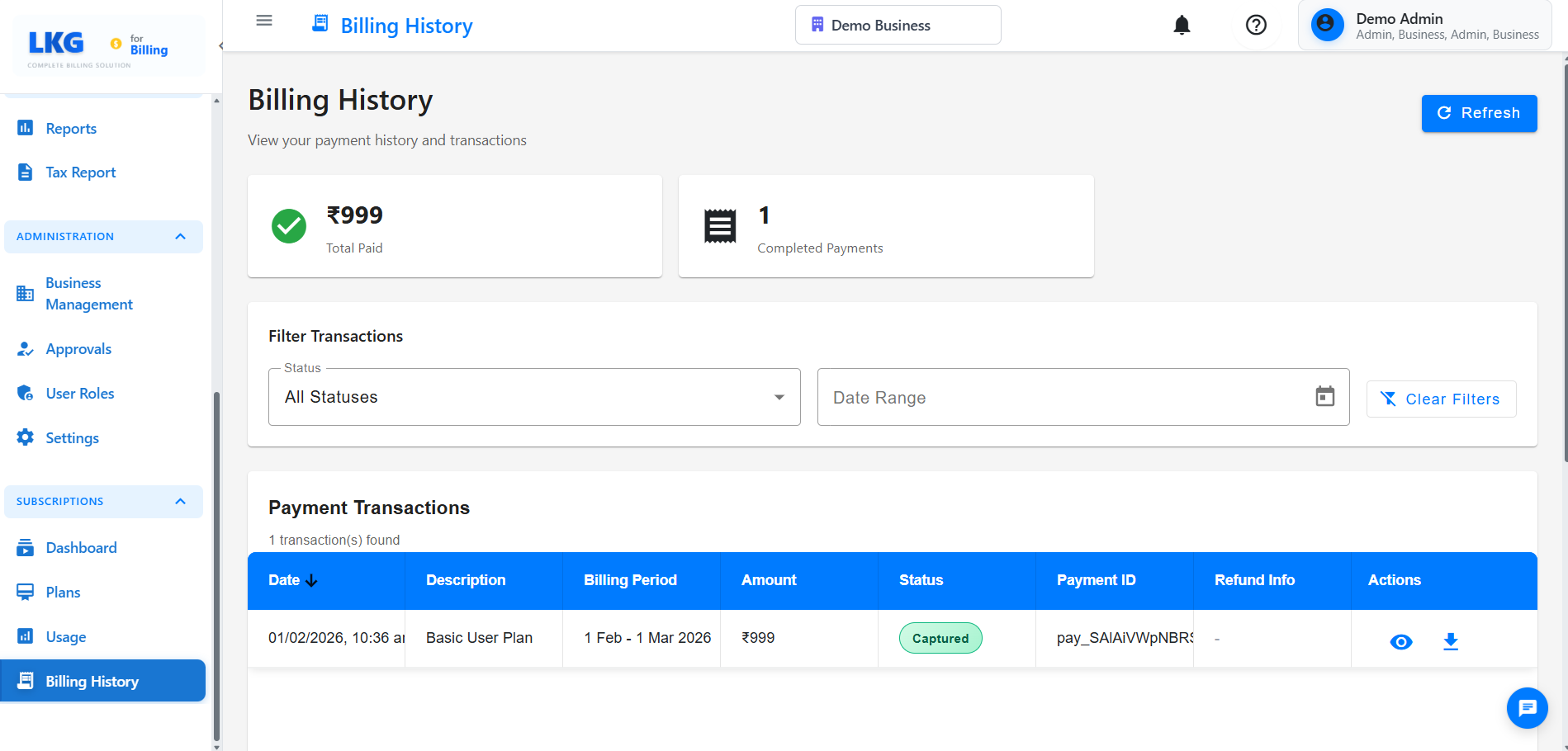
Overview
The Billing History page allows you to:
- View all past subscription invoices
- Download invoice copies and receipts
- Track payment history
- Update payment methods
- View billing cycle information
- Access tax documents
Accessing Billing History
- Navigate to Subscription → Billing from the main menu
- Or click on your profile and select Billing History
Invoice List
Invoice Information
Each invoice displays:
- Invoice Number: Unique identifier (e.g., INV-2025-001)
- Invoice Date: Date the invoice was generated
- Billing Period: Coverage period (e.g., Jan 1 - Jan 31, 2025)
- Plan: Subscription plan name (Starter, Professional, Enterprise)
- Amount: Total amount charged
- Status: Payment status (Paid, Pending, Failed)
- Actions: Download, View, Print options
Invoice Status
Paid ✅
- Payment successfully processed
- Receipt available for download
- Service active
Pending ⏳
- Payment processing
- Awaiting confirmation
- Service remains active temporarily
Failed ❌
- Payment unsuccessful
- Retry payment required
- Service may be suspended
Refunded 🔄
- Payment refunded
- Credit applied to account
- Adjustment invoice generated
Viewing Invoice Details
Invoice Breakdown
Click on any invoice to view:
Subscription Details
- Plan name and tier
- Billing cycle (Monthly/Yearly)
- Subscription period
- Pro-rated charges (if applicable)
Charges
- Base subscription fee
- Add-on charges
- Discounts applied
- Taxes (GST/IGST)
- Total amount
Payment Information
- Payment method used
- Transaction ID
- Payment date and time
- Payment gateway reference
Downloading Invoices
Download Options
-
PDF Format
- Click Download PDF button
- Professional invoice format
- Includes company details and tax information
- Suitable for accounting records
-
Print Invoice
- Click Print button
- Printer-friendly format
- Optimized layout
- Include payment receipt
Bulk Download
Download multiple invoices:
- Select invoices using checkboxes
- Click Download Selected
- Choose format (PDF or ZIP)
- Download combined file
Payment Methods
Current Payment Method
View your active payment method:
- Card type and last 4 digits
- Expiry date
- Billing address
- Default payment indicator
Adding a Payment Method
- Click Add Payment Method
- Enter card details or select UPI/Net Banking
- Verify with OTP (if required)
- Save for future payments
Updating Payment Method
- Click Update Payment Method
- Enter new payment details
- Verify the change
- Set as default (optional)
Removing a Payment Method
- Click Remove next to the payment method
- Confirm removal
- Ensure another payment method is set as default
You must have at least one active payment method for automatic renewals.
Payment History
Transaction Log
View all payment transactions:
| Date | Invoice | Amount | Method | Status | Receipt |
|---|---|---|---|---|---|
| Jan 15, 2025 | INV-2025-001 | ₹999 | Visa •••• 1234 | Success | Download |
| Dec 15, 2024 | INV-2024-012 | ₹999 | Visa •••• 1234 | Success | Download |
| Nov 15, 2024 | INV-2024-011 | ₹999 | UPI | Success | Download |
Failed Payments
If a payment fails:
- You'll receive an email notification
- Retry payment within 7 days
- Update payment method if needed
- Contact support if issues persist
Retry Payment:
- Click Retry Payment on the failed invoice
- Confirm payment method
- Complete the transaction
Billing Cycle Information
Current Billing Cycle
View your active billing period:
- Start Date: Beginning of current cycle
- End Date: Renewal date
- Days Remaining: Time until next billing
- Next Invoice Date: When you'll be charged next
- Next Amount: Expected charge amount
Renewal Settings
Auto-Renewal (Recommended)
- Automatic payment on renewal date
- No service interruption
- Email reminder 7 days before renewal
Manual Renewal
- Requires manual payment
- Risk of service suspension
- Payment reminder emails sent
Enable auto-renewal to ensure uninterrupted service and avoid late fees.
Tax Documents
GST Invoices
For Indian customers:
- All invoices include GST breakdown
- CGST + SGST for intra-state
- IGST for inter-state
- GSTIN displayed on invoice
Tax Certificates
Download annual tax summary:
- Navigate to Tax Documents
- Select financial year
- Download consolidated statement
- Use for tax filing purposes
Refunds and Credits
Refund Status
Track refund requests:
- Refund amount
- Reason for refund
- Processing status
- Expected credit date
- Refund method
Account Credits
View available credits:
- Credit amount
- Source (refund, promotion, adjustment)
- Expiry date (if applicable)
- Applied to next invoice automatically
Frequently Asked Questions
How long are invoices stored?
All invoices are stored indefinitely and available for download anytime.
Can I get a duplicate invoice?
Yes, simply download the invoice again from your billing history.
What if my payment fails?
You'll have 7 days to retry the payment. Update your payment method if needed.
Can I change my billing cycle?
Yes, contact support to switch between monthly and yearly billing.
How do I get a refund?
Contact support within 7 days of payment with your refund request.
Are invoices GST compliant?
Yes, all invoices include proper GST breakdown and are compliant with Indian tax laws.
- Subscription Plans - View and change your plan
- Usage Monitoring - Track your consumption
- Account Settings - Manage your preferences