Payment Report
The Payment Report provides detailed insights into payment collections across different payment methods, helping you track cash flow, reconcile accounts, and understand customer payment preferences.
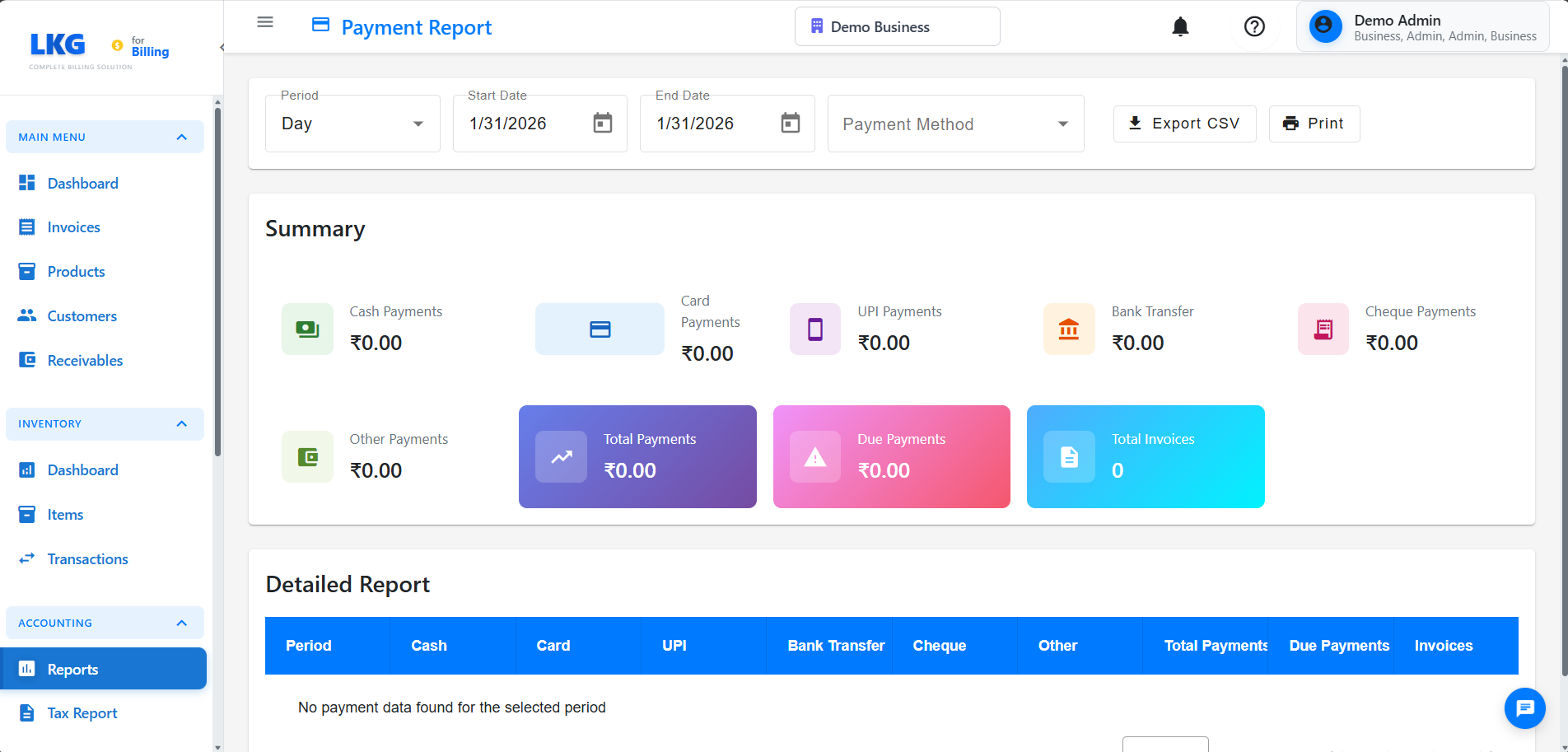
Overview
The Payment Report displays:
- Payments by method (Cash, Card, UPI, Bank Transfer, Cheque, Other)
- Total payments received
- Outstanding due amounts
- Invoice counts
- Daily, monthly, or custom period analysis
Accessing the Report
- Navigate to Accounting → Reports
- Click on Payment Report
- Select report period type
- Choose date range if custom period
- Click Generate Report
Report Period Options
Day
- View payment data for a single day
- Useful for daily cash reconciliation
- Quick end-of-day settlement review
Month
- View payment data for an entire month
- Month-to-date analysis
- Monthly financial closing
Custom
- Select any date range
- Quarter or year-end reviews
- Flexible analysis periods
Report Columns
Date
The date or period for which payments are displayed
Cash Payments
Total amount received in cash
- Physical currency payments
- Most common for walk-in customers
- Requires manual counting and reconciliation
Card Payments
Total amount received via credit/debit cards
- Includes all card transactions
- Usually processed through payment gateway
- Subject to processing fees
UPI Payments
Total amount received via UPI (Unified Payments Interface)
- Digital payments through apps like GPay, PhonePe, Paytm
- Instant settlement
- Popular in India
Bank Transfer Payments
Total amount received via direct bank transfers
- NEFT, RTGS, IMPS transfers
- Usually for larger transactions
- Requires bank statement reconciliation
Cheque Payments
Total amount received via cheques
- Physical cheque payments
- Requires bank clearance
- May take 2-3 days to clear
Other Payments
Payments through other methods
- Gift cards, vouchers
- Credit notes
- Any custom payment methods
Total Payments
Sum of all payment methods for the period
- Complete payment collection
- Compare against invoice totals
Due Payments
Outstanding amounts yet to be collected
- Unpaid invoices
- Partially paid invoices
- Overdue amounts
Invoice Count
Number of invoices associated with payments in the period
Summary Section
At the top of the report, view aggregate totals:
- Total Cash: Sum of all cash payments
- Total Card: Sum of all card payments
- Total UPI: Sum of all UPI payments
- Total Bank Transfer: Sum of all bank transfer payments
- Total Cheque: Sum of all cheque payments
- Total Other: Sum of all other payments
- Grand Total: Combined total of all payments
- Total Due: Total outstanding amount
- Total Invoices: Total number of invoices
Common Use Cases
Daily Cash Reconciliation
- Select Day period type
- Choose today's date
- Generate report
- Compare cash payment total with physical cash counted
- Identify and resolve discrepancies
Payment Method Analysis
- Run report for a month or quarter
- Compare payment method totals
- Identify preferred customer payment methods
- Optimize payment options based on usage
Collection Efficiency
- Compare Total Payments vs. Total Due
- Calculate collection rate
- Identify overdue invoices
- Follow up on outstanding payments
Bank Reconciliation
- Generate report for the month
- Export card, UPI, and bank transfer data
- Match with bank statements
- Identify missing or duplicate transactions
Monthly Financial Closing
- Set period to previous month
- Verify all payments are recorded
- Check due amounts
- Generate report for accounting records
Exporting Data
Export payment reports in multiple formats:
- Excel (.xlsx): Detailed data with formulas for analysis
- PDF: Professional format for presentations and printing
- CSV: Raw data for importing into accounting software
Best Practices
✅ Do:
- Run daily reports for cash reconciliation
- Reconcile card/UPI payments with bank statements monthly
- Follow up on due payments promptly
- Keep exported reports for audit trail
- Verify payment method totals match invoice records
❌ Don't:
- Skip daily cash reconciliation
- Ignore discrepancies between report and bank statements
- Forget to account for processing fees in card payments
- Mix payment data from different businesses
- Rely solely on reports without physical verification
Understanding Payment Status
Paid Invoices
Invoices where payment received equals the invoice total
Partially Paid Invoices
Invoices where some payment has been received but amount due remains
Unpaid Invoices
Invoices with no payments received (shown in Due Payments column)
Reconciliation Tips
For Cash Payments
- Count physical cash at end of day
- Compare with Cash Payments in report
- Account for cash expenses if any
- Investigate any differences
For Card/UPI Payments
- Download bank/payment gateway statement
- Match individual transactions
- Account for processing fees
- Verify settlement dates
For Cheque Payments
- List all cheques received
- Check clearance status with bank
- Update invoice status after clearance
- Follow up on bounced cheques
Troubleshooting
Payment Totals Don't Match
Problem: Report totals don't match expected amounts
Solution:
- Verify correct date range selected
- Check if all invoices are in the correct business
- Look for partially paid invoices
- Ensure payment methods are correctly categorized
Missing Payments
Problem: Known payments not showing in report
Solution:
- Confirm payment was recorded in the system
- Verify payment date falls within report period
- Check if invoice was marked as paid
- Look for payment in other businesses (if multi-business user)
Due Payments Seem Wrong
Problem: Due payments amount is unexpected
Solution:
- Review unpaid invoices list
- Check for partial payments
- Verify invoice statuses
- Look for overdue invoices